Microcontrollers & architecture
 3 min read
DMA: moving data without the CPU
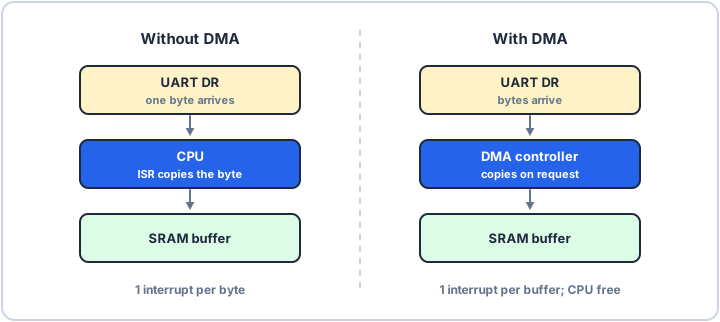
A DMA controller is a second bus master that copies data between peripherals and memory on its own. The CPU sets up the transfer once, then gets on with other work and hears back with one interrupt when the whole buffer has arrived.
The copy loop problem
Without DMA, every byte a UART receives has to be read from its data register and stored in SRAM by the CPU. At high baud rates that means an interrupt for each byte, and the CPU spends much of its time shuffling data instead of running your application.
What the DMA controller does
A DMA controller sits on the bus next to the CPU. You give it a source address, a destination address and a count, and connect it to the peripheral's request line. Each time the peripheral has data, the controller moves one item and steps the address on.
- Source and destination: a peripheral register and a buffer in SRAM, or two memory areas.
- Count: how many items to move before the transfer is complete.
- Increment: whether each address steps on after every item.
The CPU and the DMA controller share the bus. When both want it at the same moment, one waits for a few cycles, which is still far cheaper than an interrupt for every byte.
Where you meet it
Typical uses are UART and SPI receive buffers, streaming ADC samples and feeding a DAC. Many controllers also offer a circular mode that restarts the transfer automatically, which suits continuous streams, and a half-transfer interrupt so the CPU can process one half of the buffer while the other half fills.
Declare a buffer that DMA writes as volatile, so the compiler does not cache values the hardware is changing behind its back. On chips with a data cache, such as the Cortex-M7, the CPU can also read stale cached data, because DMA accesses memory directly rather than through the cache: clean the cache for a buffer DMA reads, invalidate it for a buffer DMA writes, or place the buffer in a non-cacheable region. Your chip's reference manual and vendor driver give the exact steps.