Digital Systems
 3 min read
Binary, hex and decimal
A register doesn't hold "ten"; it holds a pattern of bits. Decimal, binary and hex are three ways to write that same pattern, and hex wins in embedded work because each digit is exactly four bits.
Decimal to binary
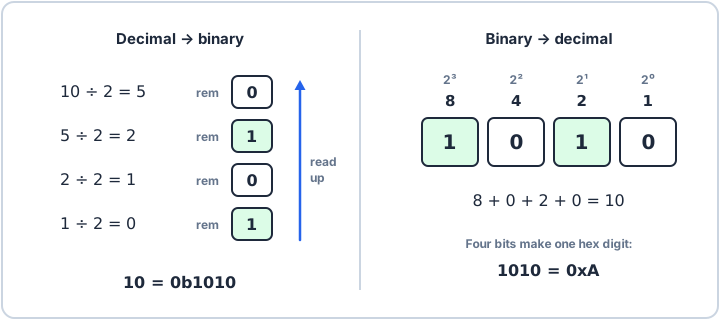
Binary uses only the digits 0 and 1, one per bit. To convert a decimal number, divide it by 2 and write down the remainder, then divide the quotient again, until the quotient is 0. The remainders, read from the last to the first, are the binary digits: 10 becomes 1010.
Binary to decimal
Each bit has a place value, doubling from the right: 1, 2, 4, 8 and so on. Add the place values of the bits that are 1. For 1010 that is 8 + 2 = 10. Eight bits reach 255, and sixteen reach 65,535, which is where the limits of uint8_t and uint16_t come from.
Why hex
Binary is exact but long; a 32-bit register is 32 digits. Hexadecimal uses sixteen digits, 0 to 9 and A to F, so one hex digit is exactly four bits. Group the bits in fours from the right and write one hex digit per group: 1010 is 0xA, and a 32-bit register is eight hex digits. Octal groups three bits per digit; you will mostly meet it in Unix file permissions.
| Decimal | Binary | Octal | Hex |
|---|---|---|---|
| 0 | 0000 | 0 | 0 |
| 1 | 0001 | 1 | 1 |
| 2 | 0010 | 2 | 2 |
| 3 | 0011 | 3 | 3 |
| 4 | 0100 | 4 | 4 |
| 5 | 0101 | 5 | 5 |
| 6 | 0110 | 6 | 6 |
| 7 | 0111 | 7 | 7 |
| 8 | 1000 | 10 | 8 |
| 9 | 1001 | 11 | 9 |
| 10 | 1010 | 12 | A |
| 11 | 1011 | 13 | B |
| 12 | 1100 | 14 | C |
| 13 | 1101 | 15 | D |
| 14 | 1110 | 16 | E |
| 15 | 1111 | 17 | F |
n = 10print(bin(n), oct(n), hex(n))print(int("1010", 2), int("0xA", 16))0b1010 0o12 0xa 10 10