C++ programming
 2 min read
Arrays and strings
An array stores a fixed number of elements of one type, next to each other in memory. Firmware favours fixed-size arrays over dynamic containers: the size is known at compile time and nothing touches the heap.
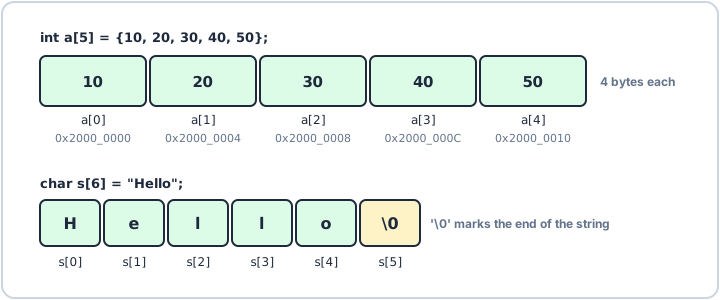
A row of elements
Elements are numbered from 0, so an array of five ends at index 4. A range-based for visits each one without any index arithmetic.
array.cppC++
#include <iostream>int main() { int a[5] = {10, 20, 30, 40, 50}; int sum = 0; for (int value : a) { sum += value; } std::cout << "first: " << a[0] << ", last: " << a[4] << ", sum: " << sum << '\n';}Output
first: 10, last: 50, sum: 150
std::array and C strings
std::array<int, 3> is the same fixed block with a size() and bounds-checked .at(). A C string is a char array ending with '\0', which the compiler adds for you: "Hello" needs six characters.
strings.cppC++
#include <array>#include <cstring>#include <iostream>int main() { char name[6] = "Hello"; std::array<int, 3> readings{4, 8, 15}; std::cout << name << " has " << std::strlen(name) << " letters" << '\n'; std::cout << "readings: " << readings.size() << '\n';}Output
Hello has 5 letters
readings: 3