Python
 3 min read
Bits, hex and masks
Reference manuals describe registers as bit fields. In Python you read a field with a shift and a mask, change bits with |= and &= ~, and print values in hex or binary with format strings, exactly as you would in C.
Reading a bit field
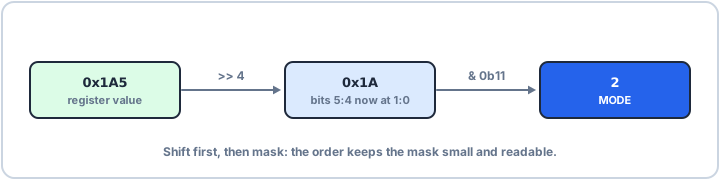
Say a status register holds 0x1A5, and the manual says bit 0 is READY and bits 5:4 are MODE. Shift right until the field starts at bit 0, then AND with a mask as wide as the field: 0b11 for two bits. Format strings show the value the way the manual does: #06x is hex with the 0x prefix, padded to six characters, and 012b is twelve binary digits.
status = 0x1A5 # read from a status registerready = status & 0x01 # bit 0mode = (status >> 4) & 0b11 # bits 5:4print(f"{status:#06x} {status:012b}")print("ready:", ready, "mode:", mode)0x01a5 000110100101 ready: 1 mode: 2
Setting and clearing bits
Writing works the same way as in firmware: OR sets a bit, AND with the inverted mask clears it. That makes Python a good place to work out the value you will write to a control register, before you put it into C.
ctrl = 0x01ctrl |= 1 << 3 # set bit 3ctrl &= ~(1 << 0) # clear bit 0print(f"{ctrl:#04x}", bin(ctrl))0x08 0b1000
hex() and bin() add the prefix but no padding, so 8 prints as 0x8. Format specs give you control: x for hex, b for binary, a width, and # for the prefix. Padding every value to the register's width keeps a column of readings lined up, so a bit that changes stands out in a long log.