Python
 3 min read
Decisions and loops
A bench script spends its life deciding and repeating: is this log line an error, did the board answer, should we try again? if/elif/else makes the decisions, and for and while do the repeating.
Sorting a log
A for loop walks through anything you can iterate: the lines of a log, the bytes of a frame, the numbers from range(). Inside it, if, elif and else choose what to do. Python has no braces; the indented block belongs to the line ending in a colon.
log = """00:01 INFO boot ok00:02 WARN vbat low00:05 ERROR i2c timeout"""for line in log.splitlines(): time, level, message = line.split(" ", 2) if level == "ERROR": print(time, "fail:", message) elif level == "WARN": print(time, "check:", message)00:02 check: vbat low 00:05 fail: i2c timeout
split(" ", 2) splits at most twice, so the message keeps its own spaces. Comparisons use ==, and conditions combine with the words and, or and not instead of C's symbols. A line that matches no branch is simply skipped; add an else when you want to catch the unexpected.
Retrying until the board answers
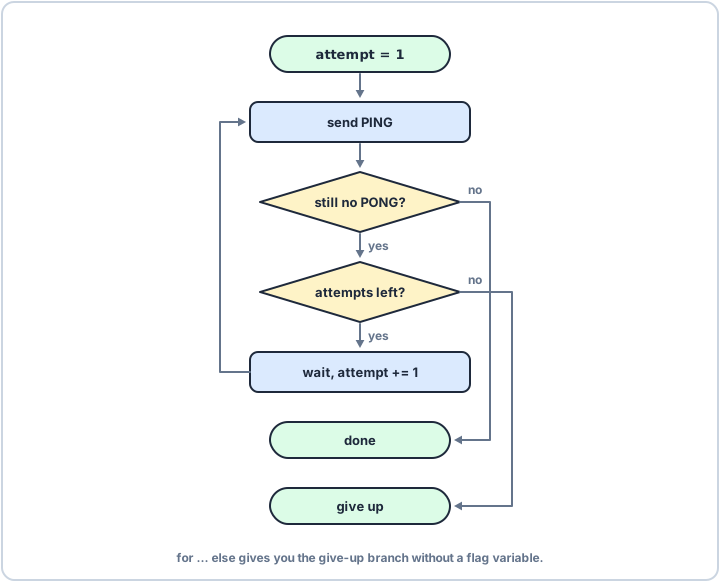
Boards boot slowly, so a script often has to ask more than once. range(1, 6) counts 1 to 5: the end value is never included. break leaves the loop early, and the else on a loop runs only if the loop finished without a break, which is exactly the "gave up" case.
replies = iter([None, None, "PONG"]) # a board that wakes up latefor attempt in range(1, 6): if next(replies) == "PONG": print("board answered on attempt", attempt) breakelse: print("no answer after 5 tries")board answered on attempt 3